Early access opening soon
Your company's documents deserve better than a shared drive.
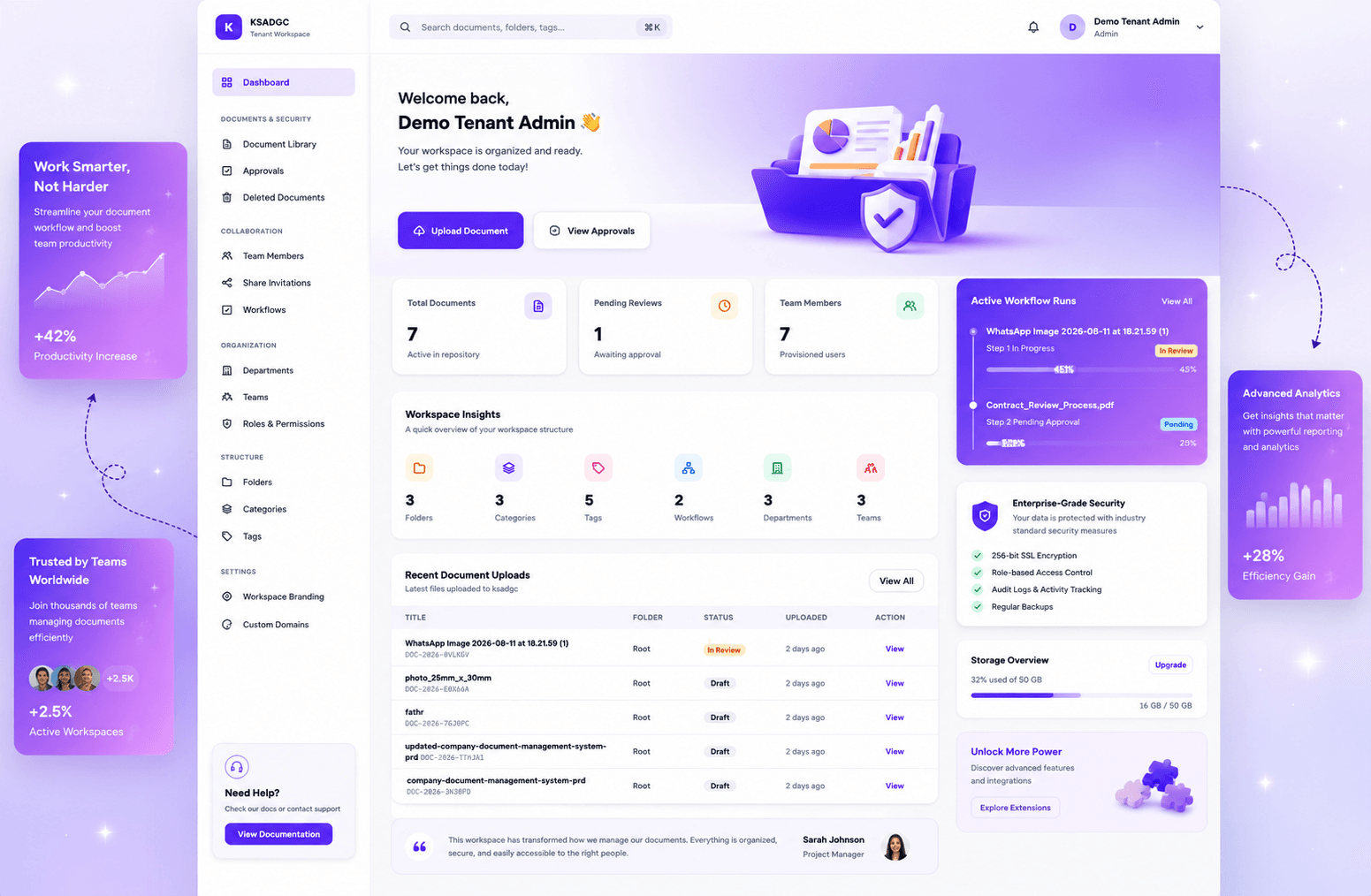
DMS gives every company one secure, organised home for its documents — with real permissions, full version history, and approvals before anything goes out the door. Built for teams that outgrew Google Drive but can't justify an enterprise contract.
0
automated tests, including cross-workspace isolation
0%
of workspaces isolated at the data, storage & audit layer
0+
features shipped before a single line of marketing
0
of your documents stored in a public web folder
The problem
Right now, your most important documents are scattered across six places.
The signed contract is in someone's email. The invoice is in a WhatsApp thread. Three versions of the same policy live in three different Downloads folders, and nobody's sure which one is final. Access control is "we trust everyone," which works right up until the day someone leaves.
"Which one is final?"
Five versions of the same file, all named final_v2_updated. No history, no way to know who changed what.
Everyone can see everything
A shared drive has folders, not permissions. Finance can browse HR. An intern can open the acquisition agreement.
Nothing gets reviewed
Documents go out without approval because there's no way to route them for review first.
When someone leaves, the files leave too
Documents on personal drives and in personal inboxes walk out with the person who created them.
How it works
One workspace.
Real control. Set up in an afternoon.
No IT consultant, no migration project, no six-week rollout.
Set up your workspace
Create departments and teams that mirror how your company actually works. Assign roles: who can upload, who can approve, who can only view. Add your logo and your own domain, so it feels like your system, not someone else's tool.
Bring your documents in
Upload files into nested folders with categories and tags. Every upload becomes a versioned document — replace it later and the old version is still there, permanently. Identical files are stored once, so fifty copies of the same policy PDF don't cost you fifty times the storage.
Put rules around them
Route documents through approval before they're official. Share with specific people, with an expiry date, and revoke it whenever you want. Set how long deleted documents stay recoverable. Every action is written to an audit log.
Features Everything you need
Everything you'd expect.
Plus the parts most tools skip.
No IT consultant, no migration project, no six-week rollout.
Documents & versions
Nested folders, categories and tags. Every file keeps its full version history, with thumbnails for quick recognition. Archive, restore and soft-delete built in.
Roles & permissions
Roles, departments and teams — not just "admin" and "everyone else." Define who can view, upload, edit, approve and delete, scoped to the parts of the company they belong to.
Approval workflows
Route a document through a review chain before it's official. Build reusable templates, or start from six ready-made shapes. Every decision is recorded.
Controlled sharing
Share with a specific person by invitation — they accept before they get access. Set an expiry, revoke any time, and see every active share in one place.
Your domain, your brand
Run the workspace on your own domain, verified by DNS. Upload your logo and it appears across every screen your team sees.
Retention & recovery
Deleted isn't gone. Users restore their own files, admins purge early when needed, and each workspace sets its own retention window before storage is reclaimed.
Storage quotas
Per-plan limits with per-workspace overrides. Identical content is stored once no matter how many people upload it, so your quota goes further than the raw file sizes suggest.
Audit log
Every security-sensitive action is recorded — who did what, to which document, and when. Available when you need to answer "how did this get out?"
API & webhooks
Issue scoped API tokens and register webhook endpoints, so Vaulta can feed the systems you already run.
Built-in isolation
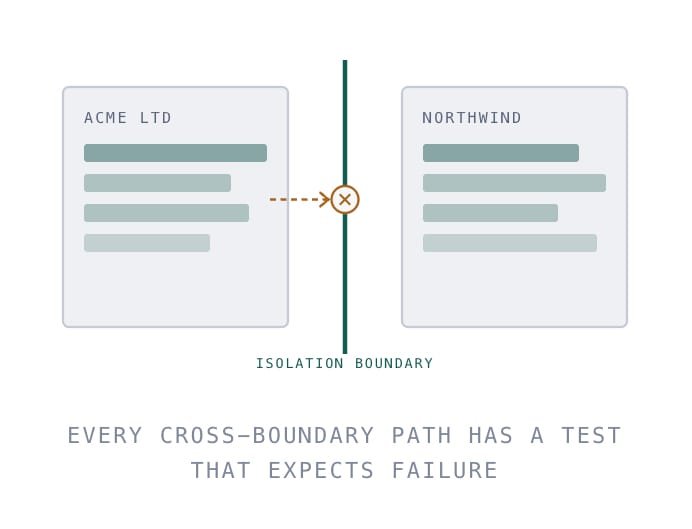
Your workspace isn't a folder in someone else's database. It's a wall.
Most multi-company platforms separate customers with a filter on a query — and one forgotten filter is all it takes for your contract to appear in someone else's search results.Vaulta enforces separation at every layer instead of one: every record carries its workspace identity, every query is scoped automatically rather than by hand, and file storage, sessions, background jobs, notifications and audit logs are all partitioned the same way.There's a category of automated test in this codebase whose entire job is to log in as one company and try to reach another company's documents. Those tests run on every change, and they're expected to fail every attempt.
In document management, "mostly isolated" is the same as "not isolated." That's why it was the first thing built, not the last.
Approvals
Nothing important should leave the building unreviewed.
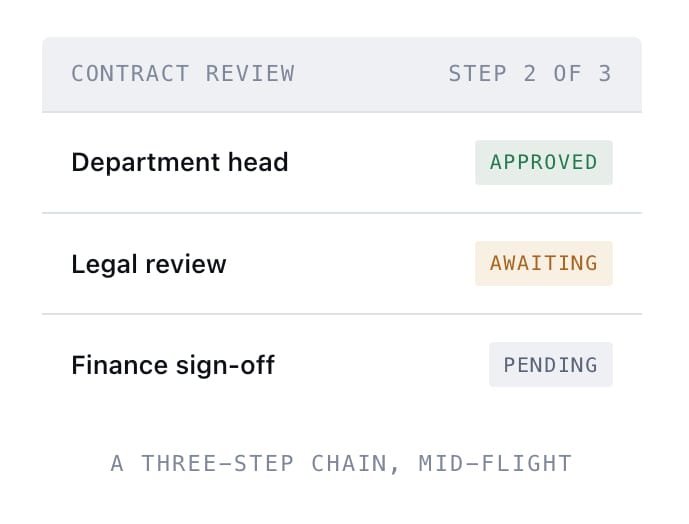
Upload a contract, send it into a review chain, and it moves from person to person in the order you defined. Each approver sees it in their queue, approves or rejects with a comment, and the document only reaches "approved" when the last step clears.Build the chains once as templates — Contract Review, Invoice Approval, Policy Sign-off — and reuse them. Six preset shapes are included, or define your own with as many steps as you need.
- Sequential steps — reviewed in the order that matches your actual process
- Reusable templates — build once, apply to every document of that type
- Full decision history —who approved, who rejected, when, and why
Retention
"Deleted" should mean recoverable — until you decide it means gone.
When someone deletes a document, it goes to trash, not to oblivion. They can restore it themselves without filing a ticket. An admin can purge it early if it genuinely needs to disappear now. And every workspace sets its own retention window — once a document passes it, it's permanently removed and the storage comes back.
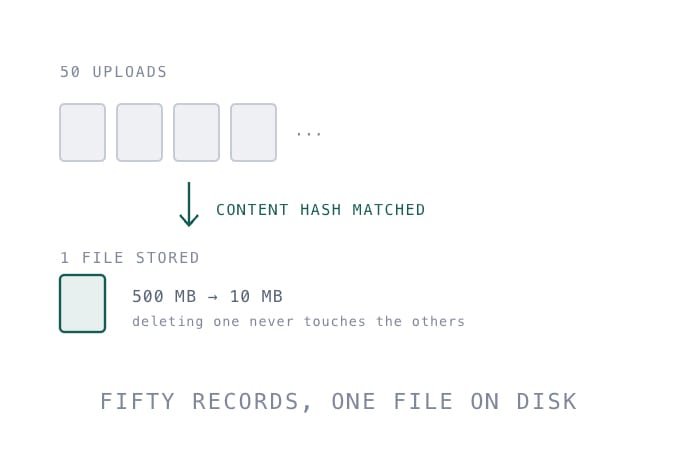
On the storage side: when fifty people upload the same policy PDF, Vaulta recognises the content is identical and stores it once. Fifty document records, one file on disk. Your quota measures what you actually store, not how many times someone clicked upload.
On the storage side: when fifty people upload the same policy PDF, Vaulta recognises the content is identical and stores it once. Fifty document records, one file on disk. Your quota measures what you actually store, not how many times someone clicked upload.
- Self-service restore — users recover their own mistakes
- Per-workspace retention window — buyou set the policy, not us
- Content deduplication —identical files stored once, quota reclaimed automatically
Security
Security you can ask questions about.
Here's what's actually implemented today — and what isn't yet.
In place today
- Documents stored outside the public web root — never directly fetchable by URL
- Downloads served through permission checks and signed, time-limited links
- Rate limiting on logins, downloads, share invitations, password changes and domain verification
- Every session ended on all other devices when a password changes
- Audit logging on security-sensitive actions
- Custom domains verified by DNS record before they go live
- Upload type and size restrictions configurable per workspace
- 439 automated tests, including dedicated cross-workspace isolation tests
On the roadmap, not built yet
- Single sign-on (SAML / OIDC)
- Two-factor authentication
- SOC 2 Type II audit
- Third-party penetration test
- Customer-managed encryption keys
- Data residency selection
If a vendor's security page has no second column, ask them why. Everything above is where this product genuinely is today — no more, no less.
Where it sits
Where DMS Stand.
Shared drive
Enterprise DMS
Our DMS
Cost
Free-ish £££ per userAffordable, flat tiersSetup time
Minutes
6+ weeks
An afternoon
Real permissions
Folder-level only
6+ weeks
Roles, departments, teams
Version history
Limited
✓
Full, permanent
Approval workflows
✗
✓
With reusable templates
Retention policies
✗
✓
Per workspace
Audit log
✗
✗
Yes
Your own domain
✗
✗
DNS verified
Single sign-on
✗
✗
On the roadmap
Needs an IT team
✗
✗
No
Lorem
Lorem Ipsum
Lorem
We're honest about the single sign-on row. It's coming — but if you need it today, an enterprise suite is the right call and we'll say so.
Who it's for
Built for the companies
enterprise software forgot.
Professional services firms
Law practices, accounting firms, consultancies. Client documents that need strict access boundaries and a defensible record of who saw what.
Growing companies (20–500 people)
Past the point where a shared drive works, nowhere near the budget or patience for an enterprise rollout.
Regulated & compliance-conscious teams
Anyone who needs retention policies, approval trails, and an audit log they can actually produce when asked.
Multi-department organisations
Where Finance, HR, Legal and Operations each need their own space, their own rules, and no visibility into each other's.
Questions
Questions people ask.
Chuck, Chuck, its' your cousin. Your cousin Marvin Berry, you know that new sound you're lookin for, well listen to this.
Is my company's data separated from other companies?
Yes — at the database, file storage, session, background job and audit log layers, not just by a filter on a query. There’s a dedicated set of automated tests whose only purpose is to attempt cross-company access and confirm it fails.
What happens to my documents if I stop using Vaulta?
They’re yours. Export is on the roadmap before general launch, and if you ever need everything out before then, email me and I’ll get it to you.
Can I use my own domain?
Yes. Add it, verify it with a DNS record, and your workspace runs on your domain with your logo.
Do you support single sign-on?
Not yet — it’s on the roadmap. If single sign-on is a hard requirement for you today, I’ll tell you honestly that this isn’t the right fit yet.
How is storage counted?
By actual stored content. If ten people upload the same file, it’s stored once and counted once.
Can I recover something I deleted by mistake?
Yes. Deleted documents go to trash and you can restore them yourself. Each workspace sets how long that window lasts before permanent removal.
Is there a free trial?
The first 50 waitlist workspaces get 3 months free. After that, there’ll be a standard trial period.
When does it launch?
Early access opens [DATE]. Waitlist members get in first, in the order they joined.